Last updated: August 11, 2026
- Two-Factor Authentication: What It Actually Is Password-only login loses because a stolen password by itself is not enough.
- FAQ Is two-factor authentication the same as two-step verification?
- A password alone is too easy to steal or reuse.
- Key Facts – 2FA adds one extra step after the password, so a stolen password is less useful.
Quick Answer: In two-factor authentication explained for non-technical users, 2FA adds a second proof to your password, and that second step is usually a text code, authenticator app code, passkey, or hardware key. The smartest everyday choice for most people is an authenticator app for important accounts, while SMS is a workable fallback when nothing better is realistic. As someone who writes about online security for regular users, my advice is blunt: turn it on anywhere a bank account, email inbox, shopping account, or work login allows it. A password alone is too easy to steal or reuse.
Key Facts
– 2FA adds one extra step after the password, so a stolen password is less useful.
– NIST and Google both recommend stronger second factors than SMS where possible.
– SMS is easier to set up, but authenticator apps reduce some carrier-related risks.
– Save backup codes before you need them; recovery is the main weak point for phone-based 2FA.
– Passkeys and hardware keys can be stronger than both SMS and basic app codes for high-value accounts.
Two-Factor Authentication: What It Actually Is
Password-only login loses because a stolen password by itself is not enough. Simple as that. Someone can know your password and still hit a wall if they do not have the second proof.
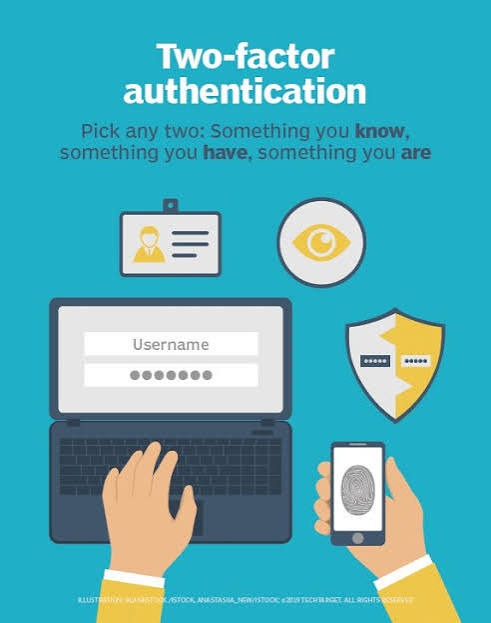
Picture two-factor authentication explained for non-technical users like this: the password opens the front door, and 2FA is the deadbolt. The second step might be a text message code, a code from an app, a tap on your phone, or a small hardware key you plug in.
Let me clear up a common mix-up. 2FA is not magic. It cuts risk a lot, but it does not make an account unbreakable. If a thief gets your phone, fools your mobile carrier, or phishes you into handing over a code, they may still get in. That is the trade-off.
The real question for most people is not “Do I need 2FA?” It is “Which kind of 2FA should I use?” My view is that an authenticator app or a passkey-like method is the better default than SMS, with one obvious exception: if the service only offers text messages, use text messages rather than nothing. The National Institute of Standards and Technology has detailed guidance on digital identity and authenticator methods, and Google’s security guidance also explains why stronger second factors are preferred; I would start there if you want a non-sales explanation from an authoritative source. NIST Digital Identity Guidelines and Google Account Help on 2-Step Verification are both useful starting points.
Text Messages vs Authenticator Apps: The Real Difference
Text-message codes are the easiest version of 2FA to understand, but authenticator apps win for security. Specifically, they are better for people who want stronger protection and can handle one extra app on their phone.
Here is the difference in plain language. With SMS 2FA, the service sends a code to your phone number. You type that code into the login screen. With an authenticator app, your phone generates a fresh code inside an app such as Google Authenticator, Microsoft Authenticator, or Authy. The code changes every short interval and never has to travel through your carrier’s text system. Most codes refresh every 30 seconds, which keeps the process quick.
And that matters because text messages can be intercepted in ways regular users do not expect. A SIM swap, a stolen phone number, or a malicious forwarding setup can let someone read codes meant for you. Not common. Still real. Authenticator apps avoid some of that exposure because the code lives on the device, not in the text network.
The drawback is usability. If you change phones and did not save your recovery options, you can lock yourself out of accounts. I have seen this enough in user support stories to say it plainly: stronger 2FA can turn into a headache if you skip backup codes. Also, some people dislike carrying one more app and one more step.
My recommendation is straightforward: use an authenticator app for important accounts if the service allows it. Use SMS when it is the only practical option or when a service makes setup with an app unusually painful. For many non-technical users who want a good balance of safety and convenience, that is the practical default.
SMS Codes: Who Should Actually Use This
SMS codes win here for accessibility and speed, not for strength. I would choose text-message 2FA for someone who needs a simple on-ramp and is likely to ignore security unless it feels familiar.
The strength of SMS is obvious: almost everyone knows how to receive a text. There is no app to install, no code scanner to learn, and no special device to buy. If a family member, older relative, or coworker has resisted security tools for years, text-based 2FA can be the difference between “enabled” and “never turned on.”
But the weakness is just as plain. Your phone number is not as private as most people think. If an attacker gets control of it, they may be able to receive your login codes. If your phone is lost or dead, you may also lose access to the texts you need. That makes SMS a decent fallback, but not the strongest choice for accounts that would hurt to lose.
I would not choose SMS for a primary email account if the service offers a better option. Email is the recovery path for many other accounts, so losing it can cascade into bigger problems. I also would not rely on SMS for banking if the bank offers an app-based method or a physical security key.
Use SMS if it is the only thing you can realistically keep turned on. Skip it if you can tolerate a slightly less convenient method that gives you better protection. The whole trade-off is convenience versus resilience, and text messages sit firmly on the convenience side.
Authenticator Apps: The Specific Situations Where They Win
Authenticator apps win for most ordinary people who want real protection without buying extra hardware. They are my default recommendation for personal email, social accounts, cloud storage, and many work logins.
What makes them better is not mystery tech. It is simply that the code generation stays on your device instead of traveling through a text network. That removes a weak point that attackers know how to exploit. Setup is usually manageable: scan a QR code, save backup codes, and enter a code to confirm.
The best fit is someone who uses a smartphone regularly and can handle basic account recovery steps. If that sounds like you, an authenticator app is usually the sweet spot. You get more security than SMS, less friction than carrying a separate hardware key, and broader support across services. Google’s 2-Step Verification guidance also shows how common this setup is for consumer accounts.
Lose the phone, factory-reset it, or delete the app without backup codes, and you may spend a very bad afternoon proving you are you. That is the consequence most generic articles forget to mention. The app itself is not the problem; poor backup habits are.
I would skip authenticator apps only if you truly cannot manage a phone-based login flow or if your organization has a better approved method, such as a hardware key for high-risk work accounts. For everyone else, this is the version of 2FA I would pick first.
The Honest Side-by-Side
Authenticator apps win on security, while SMS wins on simplicity. If you are choosing for yourself, the better question is where you need the balance to land.
| Criteria | Text Message 2FA | Authenticator App 2FA | Winner for [condition] |
|---|---|---|---|
| Setup difficulty | Easiest for most people | Slightly more steps | SMS for first-time users |
| Protection against stolen passwords | Better than none | Better than SMS | Authenticator app for important accounts |
| Risk from phone number attacks | Higher | Lower | Authenticator app when account security matters |
| Works without cell signal | Usually not reliable | Usually yes once set up | Authenticator app for travel or weak signal |
| Recovery if you lose your phone | Can be awkward | Can be awkward unless backup codes are saved | Tie if backups are stored well |
| Everyday convenience | Very familiar | Still manageable | SMS for low-friction needs |
| Dependence on a carrier | Yes | No | Authenticator app for carrier-related risks |
| Best fit for sensitive accounts | Acceptable fallback | Better default | Authenticator app |
| Best fit for reluctant users | Easier to adopt | Slightly harder to adopt | SMS for adoption |
The pattern is clear. SMS is the easier doorway into 2FA, but authenticator apps give you better protection with only a modest increase in effort. For most readers, that effort is worth it. The only time I would push SMS ahead is when the user’s real problem is getting something enabled today rather than choosing the strongest method.
Our Verdict: Which One to Choose and Why
Choose an authenticator app if you care about protecting email, banking, cloud storage, or anything that could seriously hurt you if it were taken over. Choose SMS if the account is low-risk or if the service offers only text messages and you need to turn something on right now. Neither if you cannot save recovery codes or you know you will lose access to the second factor and never set up a backup.
That is my direct recommendation. I would not overcomplicate it.
For most non-technical users, authenticator apps are the better default because they close off some of the most common attacks against text-based login codes. They are not perfect, and they do require a little more discipline. You need to save backup codes somewhere safe, and you need a plan for phone changes. But those are manageable problems.
SMS still has a place. It gets people past the “I’ll do it later” stage. For a parent, a grandparent, or a person who logs in once a week and hates new apps, text messages may be the only version they will reliably use. A slightly weaker security step that stays enabled is better than a stronger one that never gets set up.
If you want the strongest practical choice without moving into advanced territory, I would pick an authenticator app first and a hardware security key for the accounts that matter most. If that sounds like too much, start with SMS today and upgrade later.
When to Reconsider This Choice Entirely
The answer flips in a few cases, and those cases matter.
First, if your service supports a hardware security key and the account is high-value, that can beat both SMS and authenticator apps. A physical key is harder to phish and harder to steal remotely. That is why security-conscious organizations often prefer it for employees with elevated access. It is not always convenient, though, and some users will hate carrying it.
Second, if you routinely lose phones, change numbers, or forget recovery steps, any phone-based 2FA can become a lockout risk. In that situation, the best move is not “pick a different app.” It is “slow down and build a recovery plan.” Save backup codes. Update recovery email. Keep a spare method if the service allows it.
Third, if the account is low-stakes, the right answer may be less about 2FA type and more about turning it on at all. A shopping account you rarely use does not need the same protection standard as your primary email.
Fourth, if a service offers passkeys, I would take a close look. Passkeys can remove the need to type a password and may be easier for some users once set up. They are not identical to 2FA, but they are part of the same practical conversation about safer logins. The FIDO Alliance and major platform security pages explain the model in more detail.
Sources I Trust for a Non-Technical Starting Point
I would use these as starting references, not as bedtime reading:
- NIST Digital Identity Guidelines: https://pages.nist.gov/800-63-3/
- Google Account Help on 2-Step Verification: https://support.google.com/accounts/answer/185839
- FIDO Alliance passkey and authentication resources: https://fidoalliance.org/passkeys/
These are useful because they come from organizations that write about authentication as a core part of their work.
FAQ
Is two-factor authentication the same as two-step verification?
Not exactly, but people use the terms interchangeably most of the time. In practice, both mean you need a password plus a second proof.
What happens if I lose my phone?
If your 2FA lives on your phone, you may need backup codes, a recovery email, or support from the service. This is why I keep saying: save recovery codes before you need them.
Is SMS 2FA still worth using?
Yes, if it is the only method you can realistically enable. It is better than a password alone. I would still prefer an authenticator app for important accounts.
Do I need 2FA on every account?
No, but I would prioritize email, banking, shopping, cloud storage, and any account tied to password resets or money.
Can 2FA stop phishing?
It helps, but it does not stop every phishing attack. A scammer can sometimes trick you into giving them a code. Stronger methods like security keys or passkeys reduce that risk even more.