Last updated: August 11, 2026
- Text scams get nastier after identity theft.
- Key facts – 0 clicks is the safest default for a suspicious text tied to identity theft.
- The difference between a random smishing text and one aimed at identity theft victims is the setup.
- 3) “Package problem” or “missed delivery” texts A lot of people shrug off delivery texts as generic spam.
Quick Answer
Two things are true at once: if your identity has already been stolen, suspicious texts should be treated as unverified, and the safest move is to check the claim through a known official channel; in practice, that means 0 replies, 0 clicks, and 1 direct verification step. A message asking for money, a password, or a code? Contact the institution yourself. If needed, consult a professional.
Text scams get nastier after identity theft. Why? Because they press on the same raw nerve you are already dealing with: “something else is wrong, and I need to fix it now.” Don’t bite. Do not reply, tap the link, or call the number in the message; slow everything down and verify each claim through a trusted route.
Key facts
– 0 clicks is the safest default for a suspicious text tied to identity theft.
– 1 unexpected code can signal account takeover or a reset attempt.
– 3 trusted checks matter most: official app, saved statement, or known website.
– 2 authoritative resources for recovery are the FTC identity theft site and CFPB credit-freeze guidance.
– 4 common scam goals: login codes, personal data, payment, or remote access.
– If a text feels urgent or financial, consult your bank, agency, or another professional through a known number before acting.
I write about fraud, identity recovery, and consumer protection issues. One pattern keeps showing up: scammers do not need fresh data to fool people. Old breach records, public files, spoofed numbers, and a dash of urgency are usually enough. Cheap trick. Works anyway.
Text Message Scams Targeting Identity Theft Victims: What They Rely On
These scams work best on people who are already tense. If you have dealt with a data breach, account takeover, tax fraud, or medical identity theft, a note about a locked account, missing package, or “fraud alert” can feel believable fast. That is the hook.
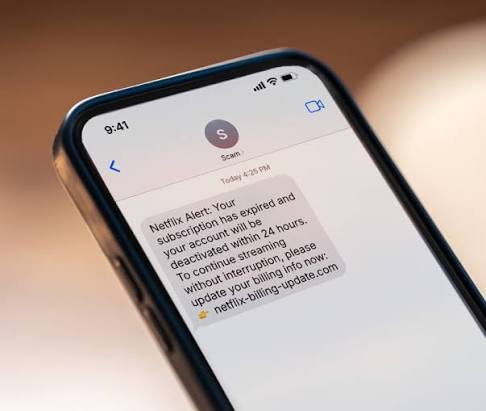
The difference between a random smishing text and one aimed at identity theft victims is the setup. A basic scam says, “Click this link.” A targeted scam says, “We saw suspicious activity on your account,” or “Your file has been flagged,” or “Confirm your identity to reopen benefits.” It borrows the language of banks, government agencies, credit bureaus, healthcare portals, delivery companies, and employers.
Think less about the fake story and more about the move it wants from you. Usually, the ask falls into one of four buckets:
- A login or verification code
- Enough personal data to pass identity checks
- A payment
- A remote-access install or malicious link click
Once they get any of those, they can drain accounts, open new ones, or impersonate you somewhere else.
The Federal Trade Commission’s guidance on phishing and smishing is a good starting point: https://consumer.ftc.gov/articles/how-recognize-and-avoid-phishing-scams. For identity recovery and official reporting, I also recommend the FTC’s identity theft site: https://www.identitytheft.gov/
The Most Common Text Scams Identity Theft Victims Get
I’d put these in the highest-risk pile because they are built to resemble cleanup steps after a breach. That makes them especially dangerous for someone already trying to repair damage. Honestly, that’s the whole trick.
1) “Fraud alert” or “account lock” texts
These messages claim your bank, payment app, or credit card has blocked activity. The link takes you to a fake login page, or the number leads to a scammer pretending to “verify” transactions. The weak spot is urgency. The scam depends on you feeling relieved that someone “caught” the fraud.
Why it works: identity theft victims expect account problems, so the alert feels plausible.
What it can cost you: a stolen password, a one-time code, or direct access to your account.
2) “Identity verification” texts from banks, payroll, or benefits offices
This one is especially ugly because it often asks for date of birth, Social Security number fragments, driver’s license images, or an uploaded document. Real institutions do sometimes need verification, but they do not usually push you to do it through an unexpected text link.
Why it works: the request sounds administrative, not criminal.
What it can cost you: enough data for a synthetic identity or account takeover.
3) “Package problem” or “missed delivery” texts
A lot of people shrug off delivery texts as generic spam. Identity theft victims should not. These scams are often the first step in credential theft, because many people reuse email and phone details across accounts.
Why it works: the message creates a harmless-looking reason to click.
What it can cost you: a login page that captures your email, password, and sometimes payment card data.
4) “Your tax refund, benefits, or case file needs attention” texts
These arrive around tax season, unemployment claims, Medicaid, Social Security, immigration paperwork, or student aid. They often sound oddly specific, which is exactly why they land. The scammer is not trying to sound trendy. Bureaucratic, even dull—that is the costume.
Why it works: identity theft victims are already used to dealing with agencies and forms.
What it can cost you: personal records, payment info, or direct deposit rerouting.
5) “Security code” or “verification code” texts you did not request
This is one of the clearest warning signs. If you receive a code you did not ask for, someone else may be trying to log in as you, reset your password, or set up a new account in your name. A follow-up text may try to pressure you into sharing that code “to stop the attempt.”
Why it works: it feels like a real defense step.
What it can cost you: a finished account takeover.
6) “Debt collection,” “medical bill,” or “legal notice” texts
These work especially well on people already dealing with fraud fallout. A scammer may reference a hospital bill, collections account, or court issue. Sometimes the fake story has nothing to do with your real problem; sometimes it is close enough to make your stomach drop.
Why it works: identity theft often creates real downstream bills and collection notices, so the text seems believable.
What it can cost you: payments to a fraudster, or another round of identity exposure.
How I’d Judge a Text Before I Touch It
My rule is plain: if a text asks me to act fast on a financial, legal, or identity matter, I assume it is a scam until I prove otherwise. That is not paranoia. It is how you take away the attacker’s edge.
Use this checklist:
- Does the text create urgency? If yes, be suspicious.
- Does it include a link or phone number I have not saved myself? Treat that as untrusted.
- Does it ask for a code, password, PIN, SSN, or photo of an ID? Do not send it; if needed, consult the institution directly.
- Does it mention an account I actually have? Do not trust the message just because it is specific. Use a known official app, statement, or website instead.
- Does it claim to be from a bank, carrier, government office, or delivery service? I would verify by typing the official address myself or using the number on a card or bill I already have.
A scam can be fake and still get one detail right. That is what makes it dangerous. The name of your bank or the last four digits of an account number do not prove legitimacy. Criminals use leaked data because it makes the lie look polished.
For consumers who want a national reporting and recovery path, the FTC’s identity theft recovery portal is still the best place to start: https://www.identitytheft.gov/
What To Do Instead of Replying or Tapping
If a text looks tied to identity theft, I would do these steps in order:
- Do not click anything in the text.
- Do not reply, even with “STOP.” That can confirm your number is active.
- Open the official app or site yourself by typing the address or using a saved bookmark.
- Check accounts for changes: new devices, forwarding rules, payment methods, addresses, and recovery emails.
- Change passwords from a trusted device if you suspect any login compromise.
- Turn on multifactor authentication where it is not already on, but avoid sending codes to anyone who contacted you first.
- Freeze your credit if identity theft is active or likely. In the U.S., that usually means contacting the major credit bureaus directly. The CFPB has practical guidance on credit freezes and fraud alerts: https://www.consumerfinance.gov/consumer-tools/credit-reports-and-scores/credit-freezes/
- Report the text to your carrier and to the FTC.
Basic list. Still worth following. People lose time when they start arguing with the scammer; I would not give the other side a conversation, because that is exactly what it wants.
The Honest Side-by-Side
| Criteria | Text scam that pretends to be urgent help | Direct verification through official channels | Winner for identity theft victims |
|---|---|---|---|
| Speed | Fast enough to pressure you into a mistake | Slower, because you have to verify | Official channels, because speed is the scam’s weapon |
| Risk of credential theft | High | Low | Official channels |
| Chance the message is fake | High | Much lower if you initiate contact | Official channels |
| Works when you are stressed | Yes, and that is the problem | Yes, because it removes the attacker’s timing | Official channels |
| Gives you a record | Sometimes, but often a fake trail | Yes, through real account history or case logs | Official channels |
| Can expose you to repeat attacks | Yes, if you reply or click | Much less | Official channels |
| Easy to use | Very | Slightly less easy | Text scam, but only because it exploits convenience |
| Good for verifying a suspicious bank notice | No | Yes | Official channels |
| Good for checking tax, benefits, or legal claims | No | Yes | Official channels |
The table is blunt because the choice is blunt. Texts are a quick way to reach you, not a trustworthy way to confirm identity problems. A good alert tells you something is wrong and points you back to a channel you already trust.
The Real Difference Between Text Scams and Real Alerts
Real alerts tell you what happened, then expect you to confirm it through a channel you already use. Scams flip that around: they try to drag the whole exchange into the text thread or a fake website.
A real bank alert usually does not need your full SSN in a text. A real agency notice usually does not threaten to close your case in ten minutes. A real delivery company will let you track the parcel through its own app or website without asking for a password over a random link. A real fraud team may tell you to call, but I would still call the official number on your card or statement, not the one in the message.
If you have already been through identity theft, this distinction matters because criminals often imitate the exact cleanup message you are waiting for. They know you are scanning for help. So the safest response is to step out of the text and into a known channel; if you are unsure, consult a trusted professional or the institution directly.
The Specific Situations Where Texts Are Most Dangerous
Text scams hit hardest in a few situations, and I would be extra careful in all of them.
After a breach or data leak
Your inbox fills with real alerts, so a fake one blends in.
While disputing fraudulent accounts
You are already juggling forms, calls, and case numbers, which makes it easier to miss a scam.
During tax season or benefits updates
Fake notices can ride on real administrative traffic.
When a scam references real personal details
That detail may come from a breach, not from a legitimate file. It is there to make you comply.
These are the moments when I would slow down the most. If the message touches money, identity documents, access codes, or a government claim, I would verify it elsewhere before taking one step.
When to Reconsider This Choice Entirely
A few situations change the usual “ignore the text and verify later” rule.
-
You already clicked and entered information.
Stop treating it like a suspicious text and start treating it like a potential compromise. Change passwords, contact the real institution, and check for unauthorized changes. -
The text includes a one-time code you requested yourself.
That can be legitimate. The key is whether you initiated the action through an official app or site, not through the text. -
The message is from a known short code you already use.
Even then, I would verify through the official app if the message asks for payment, login, or document upload. -
You are in active identity theft recovery and expect alerts.
This is the hardest case. Keep a list of every institution you are dealing with, and treat any unexpected text as unverified until you contact that institution directly or consult a professional.
If any of these apply, the answer is not “trust the text.” The answer is “switch to a known channel and document everything.”
Our Verdict: Which One to Choose and Why
Choose official-channel verification if the text asks you to log in, pay, upload documents, or share a code. Choose the text only as an alert source if it simply tells you to check an account through an app or website you already know. Neither if you are about to act because the message feels urgent, because that is exactly when identity thieves get their best results.
FAQ
How can I tell if a text about identity theft is fake?
I look for urgency, links, codes, payment demands, and any request to “confirm” personal data. If the message pushes me to act inside the text thread, I assume it is unsafe until verified elsewhere.
Should I reply “STOP” to a suspicious text?
I would not. Replying can confirm that your number is active. It is usually safer to block the sender and report the message through your carrier or the FTC.
What if the text says it is from my bank?
Do not use the link or number in the text. Open your bank’s app or use the phone number on your card, statement, or official website.
What should I do first if I already clicked?
Change passwords from a trusted device, check account settings for new devices or forwarding rules, contact the real institution, and report the incident through the FTC’s identity theft resources.
Should I freeze my credit after identity theft-related texts?
If the texts suggest account takeover, new accounts, or stolen personal data, a credit freeze is worth serious consideration. The CFPB explains the process and trade-offs clearly: https://www.consumerfinance.gov/consumer-tools/credit-reports-and-scores/credit-freezes/